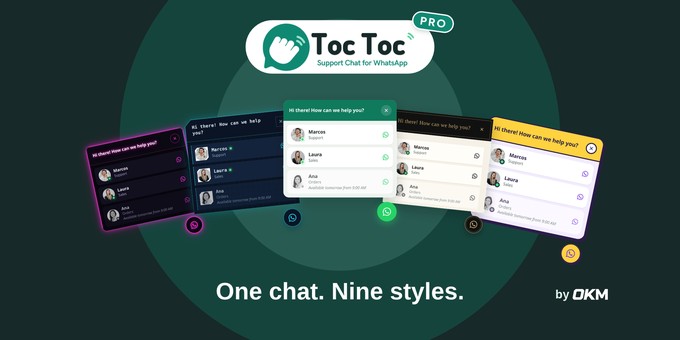
Toc Toc Pro adds a friendly chat button to your website. When a visitor clicks it, a small window opens with your agents, and one more click starts a WhatsApp conversation with the message already written.
It works with normal WhatsApp links, so there is no API, no account and no monthly fee. Each agent can have their own number, photo and schedule. Outside their hours they show in grey with the time they will be available again, so visitors always know when to expect an answer.
With WooCommerce, an "Ask about this product" button sends the product name, price, link and the chosen size and colour in the message. Nine design styles, with their own colours, animation and sound, let the chat match any kind of website.
Everything is worked out in the visitor's browser, so it stays correct with page caching, and animations stop for visitors who prefer reduced motion.
Features
- Several agents, each one with their own WhatsApp number, photo and schedule
- Up to two time ranges per day, days off and an always online or offline status
- Out of hours, agents show in grey with the time they will be available again, or are hidden
- One-click switch in the admin bar to take every agent offline
- Nine design styles: Classic, Tech, Market, Boutique, Corporate, Care, Kitchen, Playground and Neon
- Optional "toc toc" sound when the chat opens
- Display rules: by content type, only on some pages, or hidden on some pages
- An agent can answer only on the pages you choose
- WooCommerce "Ask about this product" button with the chosen size and colour
- Out of stock button, order button in My account and a WhatsApp icon on the shop pages
- Hide the chat on the cart and checkout
- WhatsApp link and QR code generator (PN
- Button for any page with a block and a
- Export and import settings
- In English and Spanish, ready for trans
- No watermark
Requirements
- WordPress 6.5 or higher
- PHP 7.4 or higher
- A WhatsApp or WhatsApp Business number<
- WooCommerce is optional
Installation
- In WordPress, go to Plugins > Add Netoc-toc-pro.zip and click Install Now.
- Activate the plugin. A new Toc Toc menui>
- Go to Toc Toc > Settings and write trst agent in international format, with thecountry code and no spaces or symbols.
- Add a name, a subtitle and a photo, ands on your website.
- Add more agents, set their schedules anli>
- With WooCommerce active, set up the proe section.
All options are explained in the documentation included in the package.