
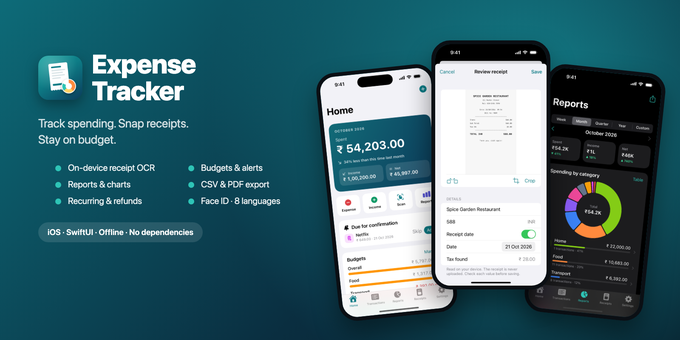
Expense Tracker is a ready-to-publish iOS app for tracking spending. Log an expense in seconds, scan the receipt and let the app read the amount, merchant and date on the device, stay on budget and see clear monthly reports. Everything stays on the phone: no account, no server, no ads, no tracking.
Transactions
- Expenses, income and refunds (refunds reduce spending in their category instead of counting as income)
- Amount, currency, category, date and time, merchant, payment method, notes, tags and receipts
- Edit, duplicate, delete with confirmation, "Save & add another", merchant and tag suggestions
- Search and filters: type, dates, categories, payment methods, tags, amount range, with/without receipt; sorting; bulk re-categorise and delete
Receipt scanning (on-device OCR)
- Document scanner with auto-crop, camera, Photos and Files (images and PDF)
- Crop and rotate before saving
- Apple Vision reads merchant, date, total, tax and currency; every value is shown for review, uncertain totals are flagged
- Free and private: nothing is uploaded, no API key needed
- Receipt inbox for receipts not yet linked, library with search, share and replace
Budgets
- Overall and per-category monthly budgets
- 50 / 80 / 100% alerts (notifications never show amounts)
- Optional rollover of unused budget
- Custom month start day to budget by salary cycle (e.g. from the 25th)
Reports
- Week, month, quarter, year or custom range, compared with the previous period
- Category donut and table, spending vs income trend, payment methods, top merchants
- Tap any row to see the matching transactions
Recurring transactions
- Daily, weekly, monthly or yearly with interval and end date
- Add automatically or remind to confirm; pause any time
- Never duplicates, even after the app was closed for a while
Export, backup & privacy
- CSV export (Excel-safe) and PDF expense report for any range
- One-file backup and restore with SHA-256 integrity checks
- Face ID / passcode lock with app-switcher blur
- All data on the device with iOS file protection; privacy manifest included
Polished experience
- 8 languages: English, Hindi, Spanish, French, German, Portuguese (Brazil), Italian, Simplified Chinese
- Branded launch screen and animated splash
- Onboarding with currency and month-start setup, sample data to explore
- Dark mode, Dynamic Type, VoiceOver labels, iPhone and iPad
- 29 currencies, amounts formatted for each language
For developers
- 100% Swift and SwiftUI (Charts, Vision, VisionKit, PDFKit), no third-party libraries
- Clean structure: Foundation-only core logic separate from the UI
- 92 core tests (run on the Mac, no simulator) and 7 end-to-end UI tests
- Money stored as whole minor units: no rounding errors
- Saved data is versioned and survives app updates; unreadable data is kept, not lost
- Rebrand from one config file and a few assets; launch screen is two assets, no code
- Debug launch options to produce App Store screenshots with sample data
- "Data Not Collected" privacy label; export compliance pre-set
Requirements
- Xcode 26 or later
- iOS 17.0 or later
- An Apple Developer account to publish
- A real device for the document scanner, camera and Face ID (everything else runs in the simulator)
What's included
- Full Xcode project source
- Core tests with a run script, and UI tests
- HTML documentation: install, rebrand, launch screen and splash, currencies and categories, languages, project structure, tests, demo data, App Store publishing
- 1024 × 1024 app icon, launch logo and colour
- String Catalogs for 8 languages
Not included
Cloud sync, exchange-rate conversion, accounts and transfers, split transactions, widgets, in-app purchases or ads.
Note for buyers
Amounts read from receipts are suggestions and should be checked. The app is not financial or tax advice.
Support: eeshu161286@gmail.com
$29


0
Comments
| Created | 25 Oct 2026 |
| Package Includes | N/A |
| File Size | 880 KB |
© All Rights Reserved Dheerendra161286
Report This File
Report This File


