
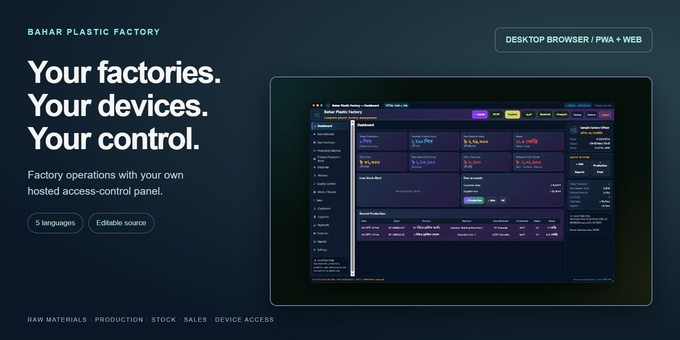
Bahar Plastic Factory Desktop & Web Management combines a practical factory workspace with a control panel hosted by the buyer. Manage raw materials, purchases, production batches, finished stock, machines, workers, quality checks, waste, sales, customer and supplier payments, expenses and reports.
For owners operating several factories or installations, the included control panel manages registered device access, approval, Paid/Full versus Demo mode, bans and online/offline status. The installed application uses the buyer’s controller; the author’s approval server is not required. Editable application and controller source are included.
The login screen has Officer Login, Staff Preview and Admin Panel buttons. Officer Login retains the original full-access login. Staff Preview retains password-free demo behavior; it is not a restricted employee account or a staff permission system. Admin Panel opens the separate password-protected owner controller.
Desktop in this package means desktop browser or installed browser PWA. Web/PWA source is supplied; native Windows EXE, APK, IPA and Mac binaries are not included.
Business records stay in each browser profile. The controller manages identity/device/access metadata, not consolidated factory accounts. There is no automatic cross-branch business-data synchronization or local-data encryption. Separate origins or browser profiles are needed to isolate factory datasets.
Five interface languages and the original voice selections are retained. Optional Azure speech uses the buyer’s own key; cached welcome audio and available browser voices determine offline playback. A detailed English guide covers installation, owner setup, approval workflows, stock and sales reconciliation, payments, branding, languages, currency, backup and restore.
Features
- Raw material masters and opening stock
- Supplier purchases, calculated raw stock and payment tracking
- Production batches with good output, rejects and waste
- Finished products, photos, opening stock and low-stock alerts
- Machines, worker records and quality-control logs
- Waste/recycling records and operational reports
- Sales, browser printing, sales CSV and customer/supplier dues
- Expenses and approximate operational summaries
- JSON business backup and replacement restore
- Buyer-hosted PHP/SQLite device control panel
- Device approval, Paid/Demo policy, bans and status monitoring
- Officer Login, Staff Preview and Admin Panel navigation
- Bengali, English, Arabic, German and French interface choices
- Optional configurable multilingual voice assistance
- Desktop browser/PWA + Web source
- 16-section practical English guide and optional blank workspace JSON
Requirements
HTTPS hosting with PHP 8.1+ and PDO SQLite, PHP sessions and Apache 2.4 directory protection (or equivalent server rules). Grant PHP limited write access for the controller database. Tested locally with PHP 8.4.27.
A current desktop/mobile browser with IndexedDB and localStorage. PWA installation and platform speech capabilities vary. A fresh control check requires the buyer’s controller online.
Optional Azure speech: buyer’s own Azure Speech key/region, PHP cURL and outbound HTTPS; cloud usage is separate. Optional push uses the included Composer dependencies and browser notification permission. Controller interface online assets need internet connectivity. No MySQL or Node build step is required.
Instructions
1. Open Documentation/index.html in the main ZIP and read START-HERE.txt.
2. Upload the contents of source/ to a NEW HTTPS hosting directory, retaining .htaccess files.
3. Verify private configuration and controller/app_database.db cannot be downloaded.
4. Open controller/ immediately and create the owner’s private administrator password using the original setup form.
5. Register the local factory account and use Staff Preview to enrol the device. In the controller grant the appropriate Paid/Full mode.
6. Use Officer Login; if a separate Full serial is Pending, approve that row and retry.
7. Configure business settings. Preserve a backup before replacing the original sample with Blank-Workspace.json; restore replaces local business data.
8. Configure optional Azure speech privately using the buyer’s own key. For additional installations, follow the guide’s shared-controller and data-isolation steps.

